Find any song in your set. Instantly.

On stage there’s no time to scroll. Type a few letters into Songhunt and your song is there: tempo, time signature and your notes in big, clear text, while Live jumps straight to the song’s scene, ready to launch. Songhunt reads your songs right from your Live Set, works with your controllers, and fits into Ableton Live Intro, Standard or Suite with no Max for Live needed.

Version 1.0 · macOS · AU & VST3 · Launch price $19 (reg. $29) until November 3

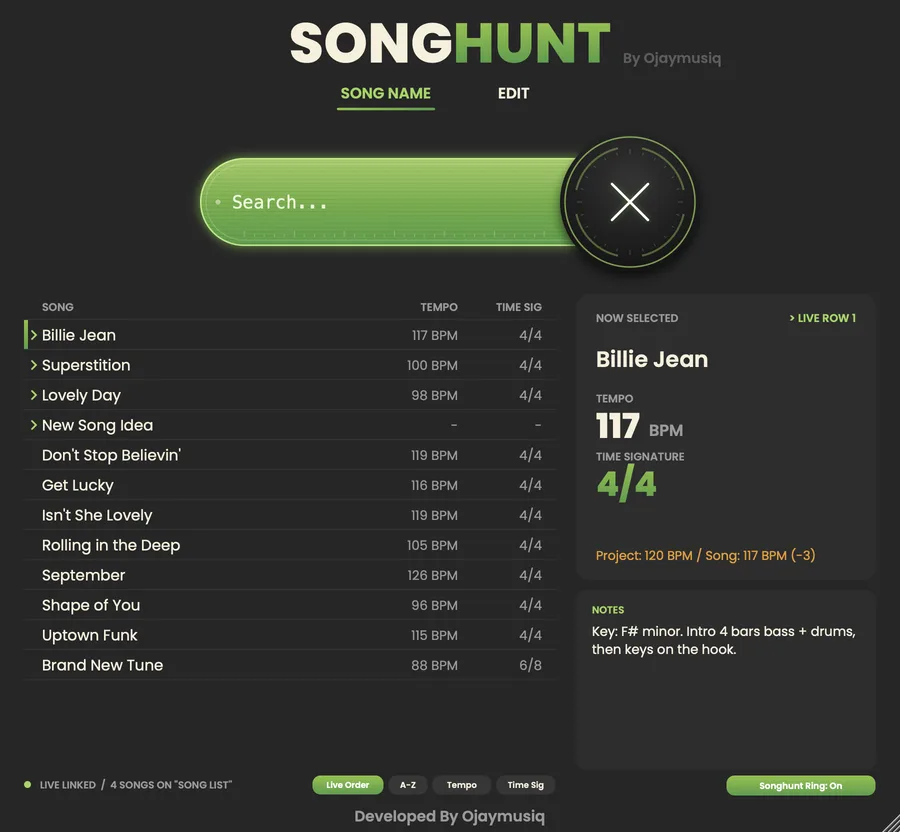
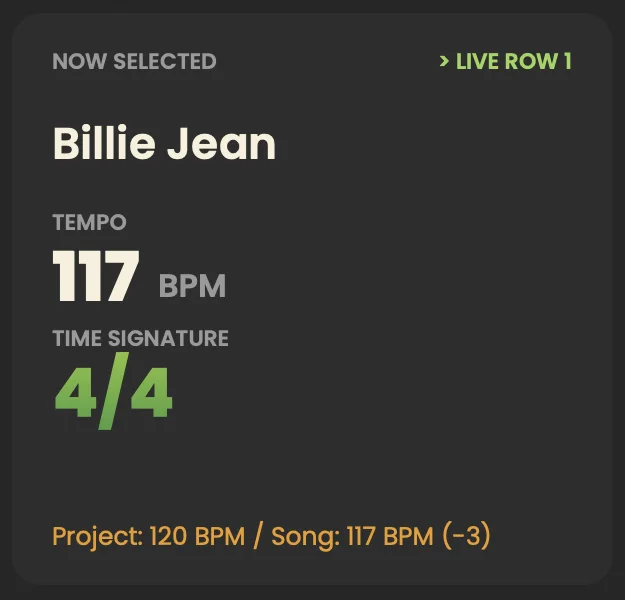
Songhunt’s main view: search bar, 15-song list, Now Selected panel, notes and the Songhunt Ring button Detail: the Now Selected panel showing Billie Jean at 117 BPM in 4/4, LIVE ROW 1

Made for players who run their show from Live.

Find any song in your set. Instantly.

  • Keyboard players and musical directorswho run backing tracks, sounds or arrangements from Ableton Live.
  • Live bands and worship teamswith long setlists.
  • Anyone who has had to huntfor the next song on stage.

Search it. See it.

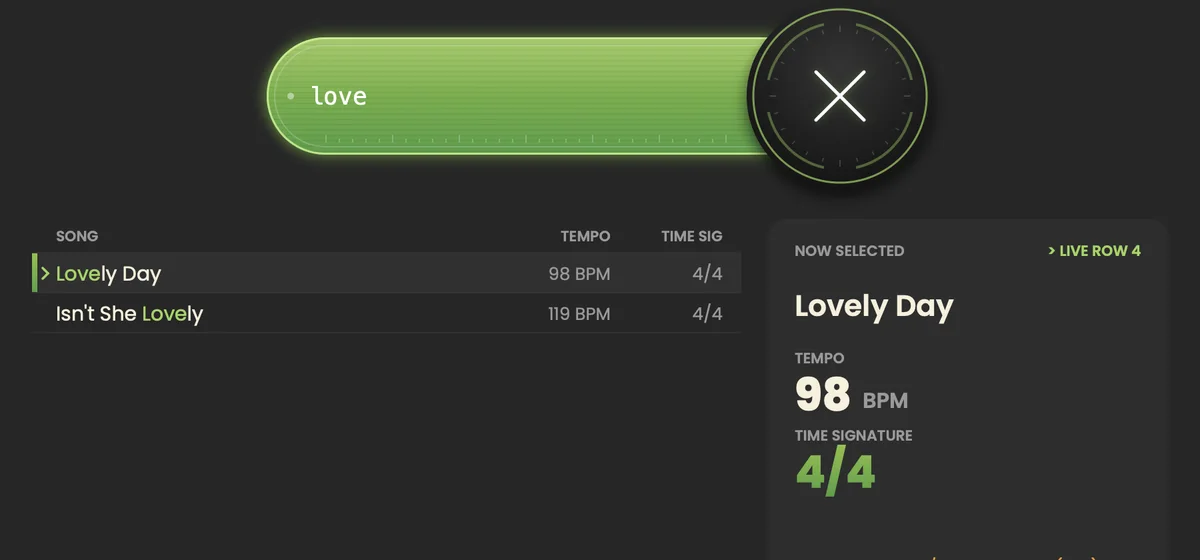
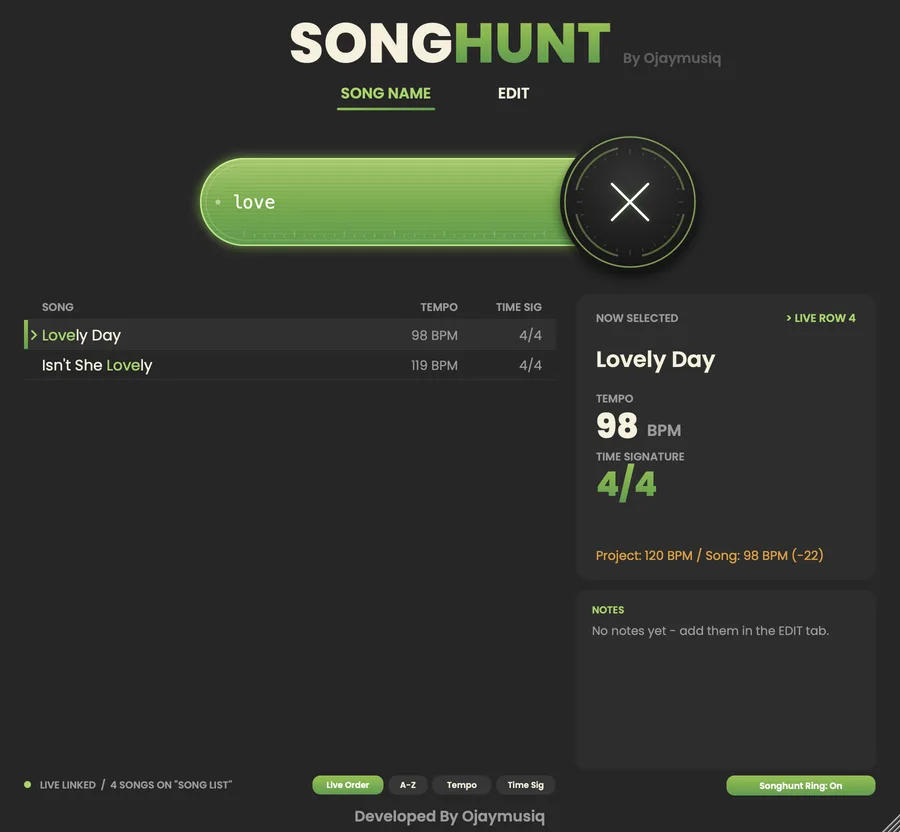
Typing “love” filters the list, with matching letters highlighted
01

Instant search.

Results appear as you type. Search ignores capitals and matches any part of the name (“love” finds Lovely Day). Matching letters are highlighted.

  • Keyboard-friendly. Up/Down and Enter pick a song, Esc clears the search.
The Now Selected panel: song name, tempo and time signature in large text, with the project tempo below
02

Built for the stage.

The selected song’s name, tempo and time signature are shown in big text, with your notes (key, chords, cues) right underneath.

  • Tempo and time signature from Live. Each scene’s tempo and time signature flow into Songhunt automatically. Songhunt also shows the project tempo, so you can spot a mismatch.
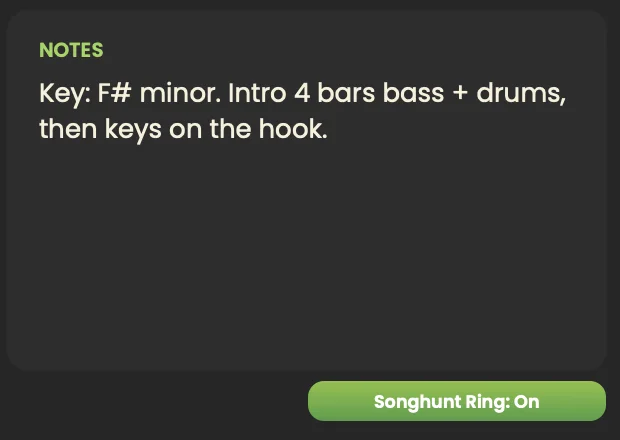
The Notes panel and the Songhunt Ring: On button
03

Jumps Live to the song.

Picking a song selects its scene (row) in Live and moves the session box on controllers like Push, APC, Launchpad and MPK to that row. Nothing starts until you’re ready.

  • Songhunt Ring. No controller? Songhunt draws its own red ring in Live: five rows from the chosen song, across every track to the Main track. Turn it on or off with one button; the choice is saved with your Live Set.
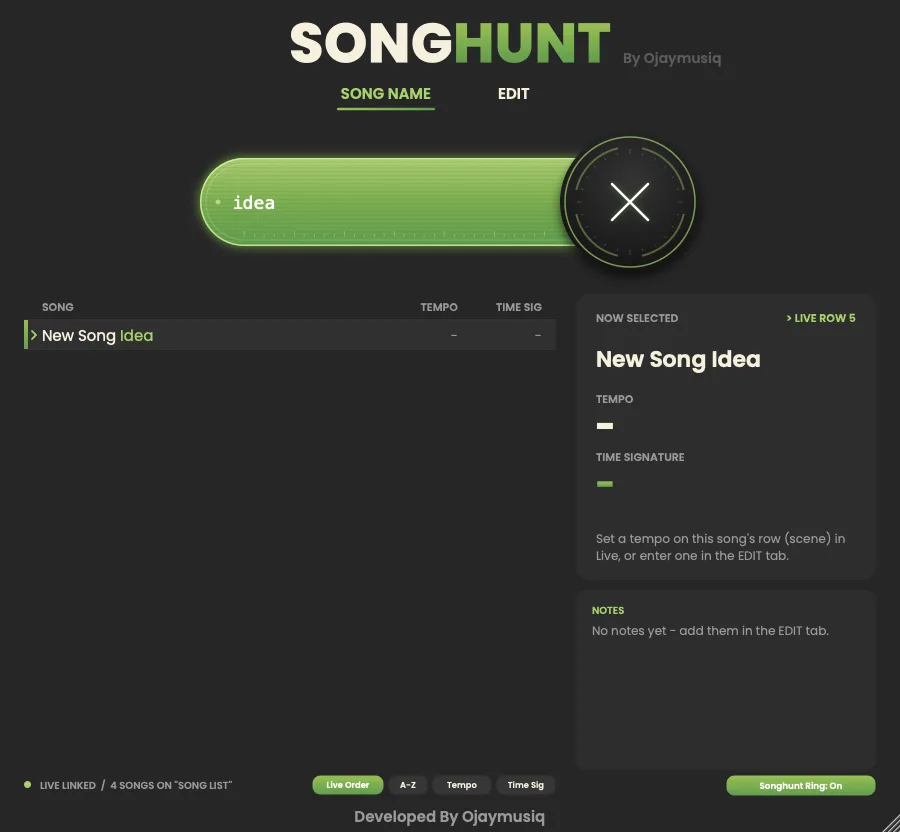
Searching “idea” finds New Song Idea, a song found only in the Live Set, at LIVE ROW 5
04

Reads your Live Set.

Name a clip >Song Name on a track called Song List, and it appears in Songhunt automatically. No typing everything in twice.

  • Two-way sync. Rename a > clip in Live and Songhunt follows.
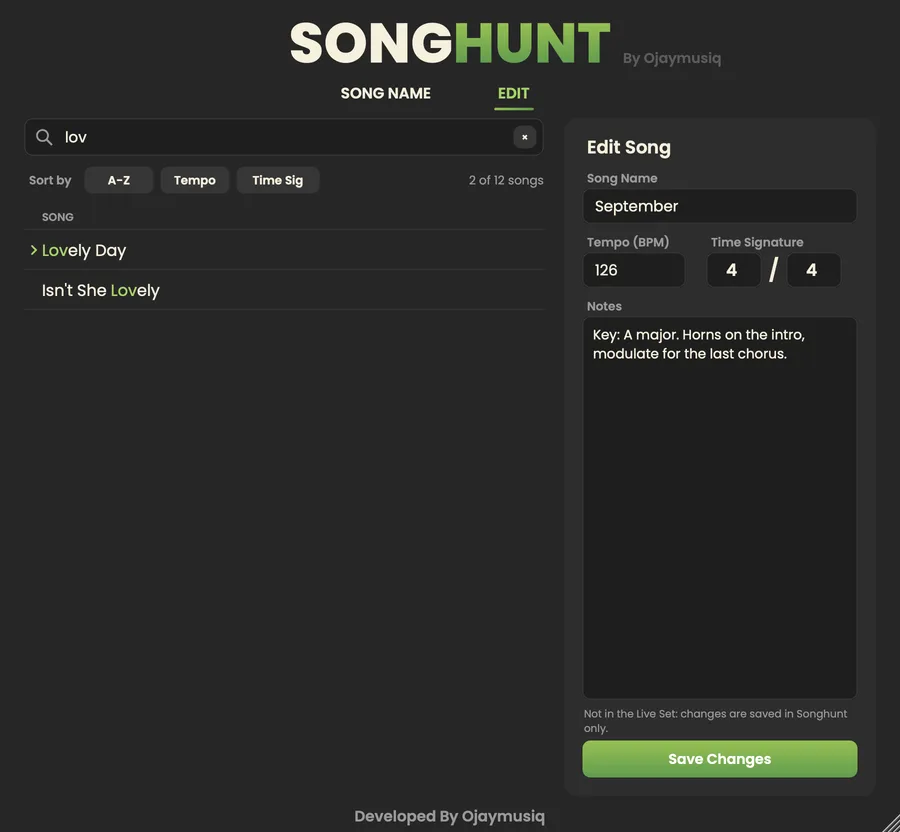
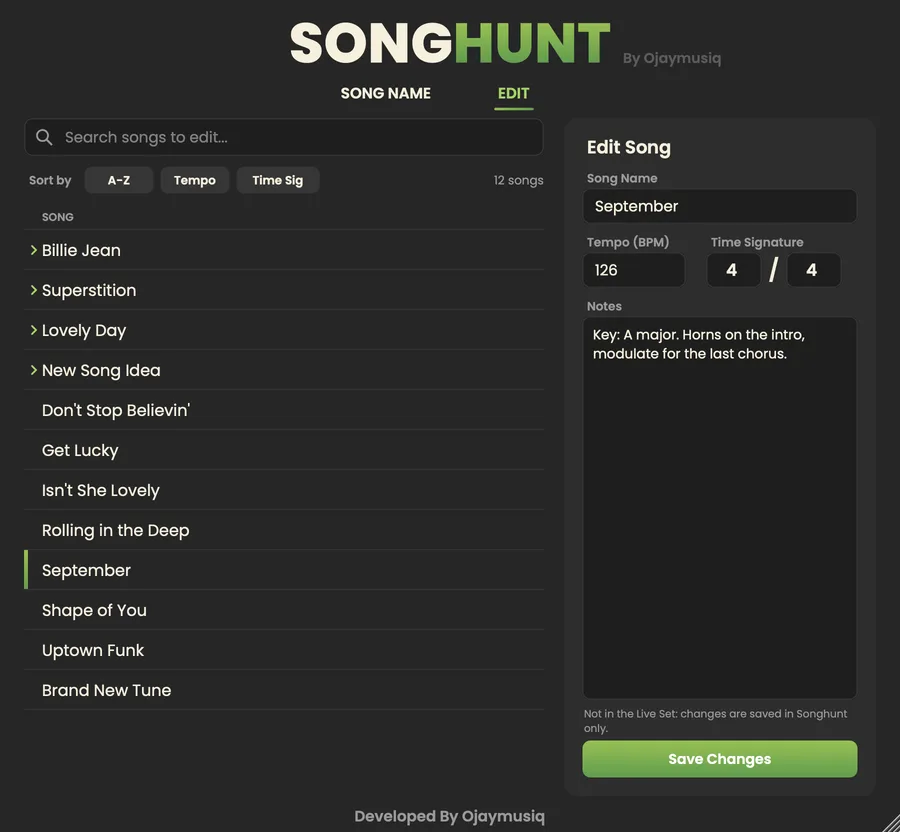
The EDIT tab while searching: search field, song list and the Edit Song form
05

Edit in one place.

Search for a song in the EDIT tab, then rename it or change its tempo, time signature or notes. Live is updated too: the clip name and the scene’s tempo and time signature. The song keeps its place in your set.

Sort your list
By Live order, A–Z, tempo or time signature.
Big setlists welcome
15 songs on screen at once, and no limit on how many songs your set can have.
One library for every project
Songs and notes are saved once and shared by all your Live Sets.
Doesn’t touch your sound
Songhunt passes audio through untouched, so you can put it on any track.
Easy install and clean uninstall
With a one-click installer, an uninstaller, and a fix tool for setups where Live runs from an external drive.

How it works.

  1. Install

    Install Songhunt with the installer (about 1 minute).

  2. Turn it on

    In Live: rescan plug-ins, and choose Songhunt as a Control Surface.

  3. Name your songs

    On a track called Song List, name each song’s clip with a > in front, e.g. >Billie Jean.

  4. Find

    Drop Songhunt on any track, type to find a song, and Live jumps to it.

Why a “control surface”?

Ableton doesn’t let plug-ins control Live by themselves. Songhunt includes a small control surface script (installed automatically), which works in every edition of Live, including Standard. Max for Live is not needed.

See Songhunt.

Screenshots use demo songs. Scroll sideways for more.

The main view: search bar, 15-song list, Now Selected panel, notes and the Songhunt Ring button
Typing “love”: live filtering with highlighted letters
A song found only in the Live Set, with its Live row shown
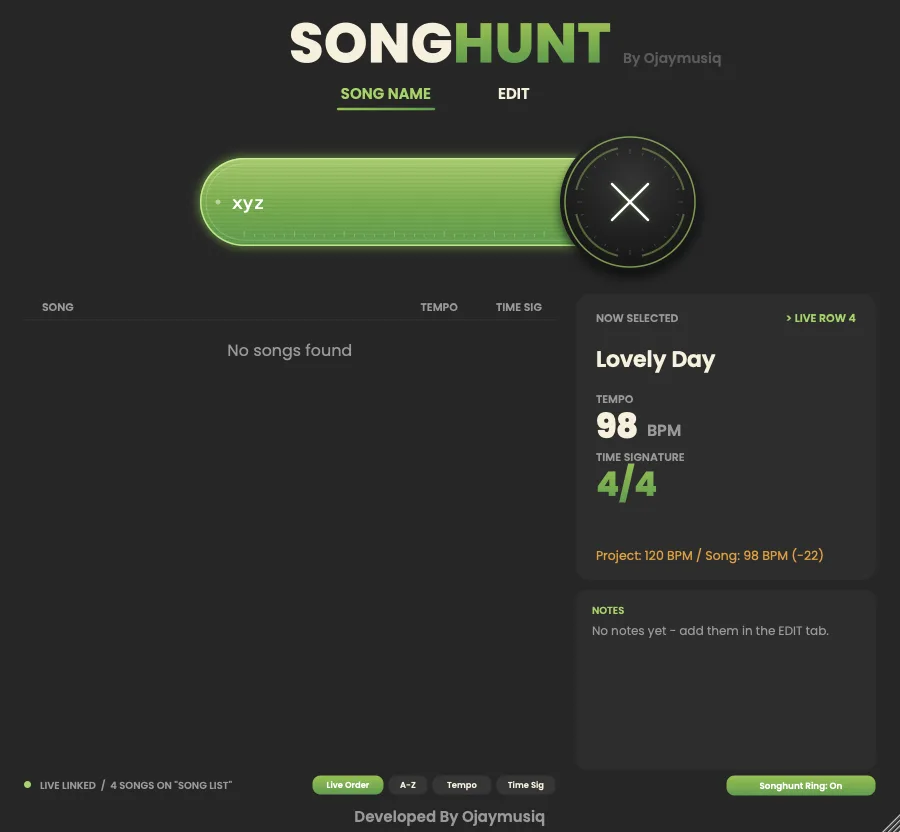
The “No songs found” message
The EDIT tab: search, song list, name, tempo, time signature and notes
The EDIT tab while searching

Tech specs.

Songhunt is currently for macOS only. There’s no Windows version yet.

Version
1.0, the public launch
Operating system
macOS 11 Big Sur or newer
Processor
Apple Silicon or Intel
Host
Ableton Live 11 or 12: Intro, Standard or Suite
Plug-in formats
Audio Unit (AU) and VST3
Max for Live
Not needed
Disk space
About 20 MB
License
License key from your receipt email. Each key works on 2 computers; after activating, Songhunt works offline. License checks happen quietly in the background, at most every 14 days, and never interrupt you on stage.
Download
SongHunt 1.0.dmg (about 9 MB): Songhunt Installer.pkg, Songhunt Uninstaller.pkg, Fix Songhunt Control Surface.command, Read Me.txt
Install
  1. Quit Ableton Live. Open the .dmg and double-click Songhunt Installer.
  2. In Live, go to Settings → Plug-Ins, turn on Use Audio Units and Use VST3 Plug-In System Folders, then hold Option and click Rescan. Then go to Settings → Link, Tempo & MIDI and choose Songhunt as a Control Surface.
  3. Name a track Song List, name song clips like >Billie Jean, and drag Plug-Ins → Ojaymusiq → Songhunt onto any track.
  4. The first time, Songhunt asks for your license key. Paste it and click Activate. You need to be online for this once.

If your Mac says the installer can’t be opened (it’s from an independent developer): click Done, open System Settings → Privacy & Security, scroll down and click Open Anyway next to “Songhunt Installer.pkg”, then confirm. On macOS 14 or older you can also right-click the installer and choose Open.

Uninstall
Run Songhunt Uninstaller. It removes everything, and the song list is moved to the Trash. Your license activation stays on this Mac, so reinstalling won’t ask for the key again.

Buy
· license key by email, 2 computers per key
Support
[email protected]

One price. Yours to keep.

One-time payment. No subscription.

Current version

$19$29one-time

Launch price until November 3, 2026.

Songhunt 1.0, with all 1.x updates.

  • Songhunt 1.0 for macOS (AU & VST3)
  • All 1.x updates
  • 2.0 would be a paid upgrade
  • 2 computers per key; works offline after activating

Lifetime Best value

$59one-time

Includes all future updates and versions of Songhunt.

  • Songhunt 1.0 for macOS (AU & VST3)
  • All 1.x updates
  • All future versions, including 2.0 and beyond
  • 2 computers per key; works offline after activating

License key by email. Each key works on 2 computers. Additional licenses 30% off when a key is already on 2 computers.

What’s new.

Version 1.0

Everything from the private test builds below, plus:

  • License activation. Buy, paste the key from the receipt email once, and Songhunt is unlocked. Each key works on 2 computers; after activating, Songhunt works offline. It never interrupts you on stage: license checks happen quietly in the background, at most every 14 days.
  • “Licensed to” line at the bottom of the EDIT tab, with how many activations are left and a “Change license” link (to move your key to another computer).
  • Get an additional license at a discount (30% off) when a key is already on 2 computers.
  • Reinstalling or updating keeps your activation and your songs.

The versions below were private test builds before the public launch.

Pre-release build 1.4

  • New: Songhunt Ring on / off. A button under Notes shows or hides Songhunt’s own red ring in Live, straight away. It’s saved with your Live Set. Turn it off if you only want to see your controller’s ring (Push, APC, Launchpad, MPK...).
  • New: a bigger ring. Songhunt’s ring is now five rows tall from the chosen song, across every track and return track to the Main track.
  • Improved: controllers’ rings always start at track 1 on the song’s row.
  • New: 15 songs on screen at once (was 12).

Pre-release build 1.3

  • New: the red box covers the whole song. Picking a song draws Songhunt’s red box around its entire row in Live: every track and return track, across to the Main track. It resizes by itself when you add or remove tracks.
  • Your controllers’ session boxes (Push, APC, Launchpad...) still follow the song.

Pre-release build 1.2

  • New: a cleaner main view showing 12 songs at a time, with your notes right under Now Selected.
  • New: search in the EDIT tab. Type to filter, press Enter to open the top match.
  • Improved: editing a song keeps it in the same place in Live order.
  • New: picking a song moves Songhunt’s own red session box, and your controllers’ boxes, to the song’s row.
  • Fixed: big sets (over about 150 songs) now load in full.
  • New connection indicator: “LIVE LINKED” or “LIVE NOT LINKED”.
  • New fix tool for Macs where Live’s User Library is on an external drive.
  • Improved: a simpler Read Me, and a single disk image download (Songhunt 1.2.dmg).

First private build

  • Released first as “Song Search”, and renamed to Songhunt the same day.
  • Instant search with highlighted matches, and the big “Now Selected” display.
  • Songs read from > clips on the Song List track. Picking a song selects its row in Live.
  • Tempo and time signature read from the scene in Live.
  • EDIT tab: name, tempo, time signature (e.g. 6/8) and notes, all synced back to Live.
  • Renaming a clip in Live renames the song in Songhunt.
  • Sorting by Live order, A–Z, tempo or time signature.
  • Green gradient theme with a glowing search bar.
  • macOS installer, full uninstaller, and a disk image.

Questions.

Does it work with Ableton Live Standard / Intro?

Yes. Songhunt works with Intro, Standard and Suite, and doesn’t need Max for Live.

Is there a Windows version?

Not yet. Songhunt is currently for macOS only.

Does Songhunt change my sound?

No. It passes audio through untouched.

Does it work with my controller (Push, APC, Launchpad...)?

Yes. It runs alongside them, and picking a song moves their session box to the song’s row. Some third-party controller scripts don’t allow this; use the controller’s own “follow selection” setting for those.

My Mac says the installer “can’t be opened.”

It’s from an independent developer. Click Done, open System Settings → Privacy & Security, scroll down and click Open Anyway next to “Songhunt Installer.pkg”, then confirm. On macOS 14 or older you can also right-click the installer and choose Open.

“Songhunt” isn’t in the Control Surface list.

This usually happens when Live’s library is on an external drive. Quit Live and run Fix Songhunt Control Surface from the .dmg.

How many computers can I use Songhunt on?

Each license key works on 2 computers. After activating, Songhunt works offline. To move your key to another computer, click “Change license” at the bottom of the EDIT tab first. Need a third computer? Additional licenses are 30% off.

Where is my license key?

In your receipt email. Paste it once and click Activate; you need to be online for this once.

I need help with my key or a new computer.

Email [email protected].

Where are my songs saved?

On your Mac, shared by all your Live Sets: ~/Library/Application Support/Ojaymusiq/Songhunt/

Will uninstalling delete my songs?

The uninstaller moves your song list to the Trash, so you can restore it until you empty the Trash.

Still have a question? Email [email protected], or

SONGHUNT logo: a neon-green magnifying glass between audio bars

Your setlist, one keystroke away.

Songhunt 1.0 for Ableton Live on macOS. Launch price $19 (reg. $29) until November 3.

See pricing