Happy holidays from Songhunt. Wishing you full rooms and easy finds.

Season’s greetings

Find any song in your set. Instantly.

On stage there’s no time to scroll. Type a few letters into Songhunt and your song is there: tempo, time signature and your notes in big, clear text, while Live jumps straight to the song’s scene, ready to launch. Songhunt reads your songs right from your Live Set, works with your controllers, and fits into Ableton Live Intro, Standard or Suite with no Max for Live needed.

macOS · AU & VST3 · $29 one-time

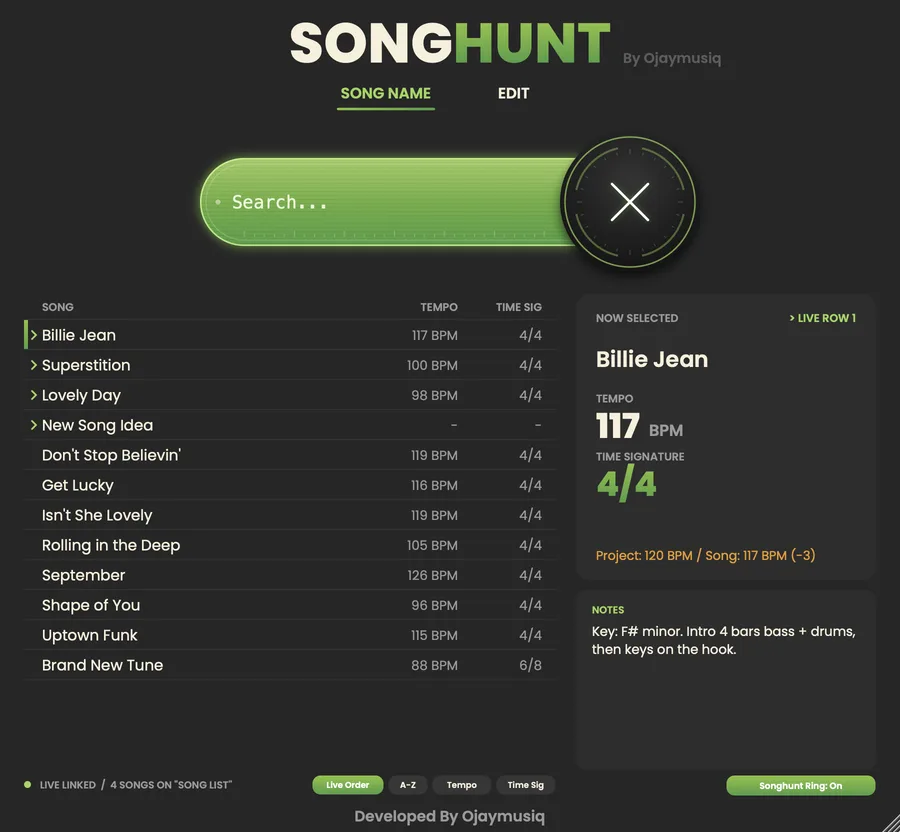
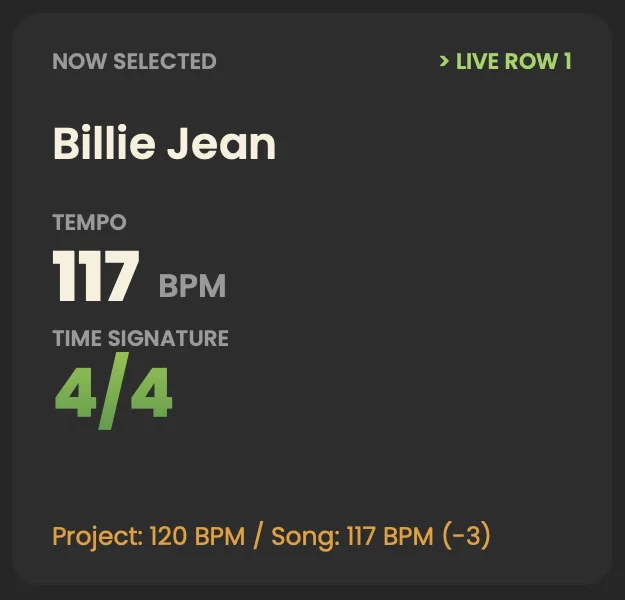
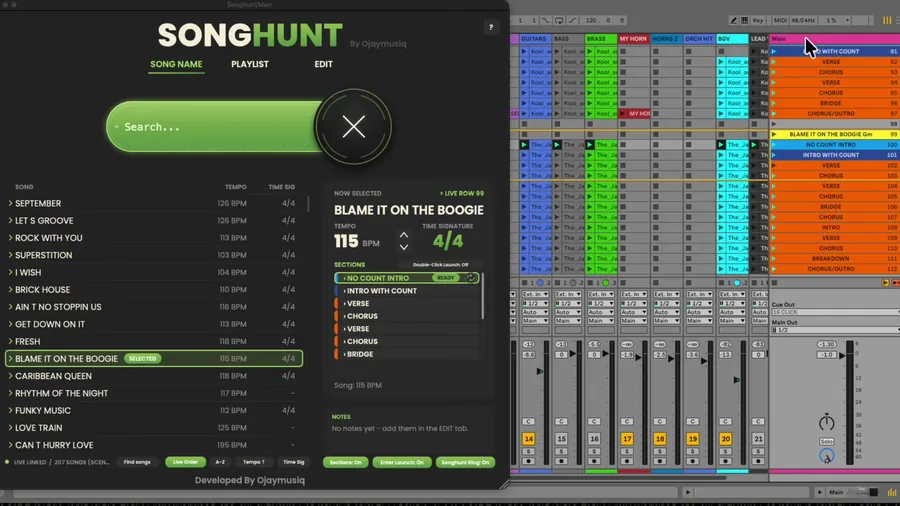
Songhunt’s SONG NAME view: search bar, a 15-song list with Blame It On The Boogie marked SELECTED, Now Selected with sections, tempo arrows and Song: 115 BPM, and Enter Launch on Detail: the Now Selected panel showing Billie Jean at 117 BPM in 4/4, LIVE ROW 1

Made for players who run their show from Live.

Find any song in your set. Instantly.

  • Keyboard players and musical directorswho run backing tracks, sounds or arrangements from Ableton Live.
  • Live bands and worship teamswith long setlists.
  • Anyone who has had to huntfor the next song on stage.

Search it. See it.

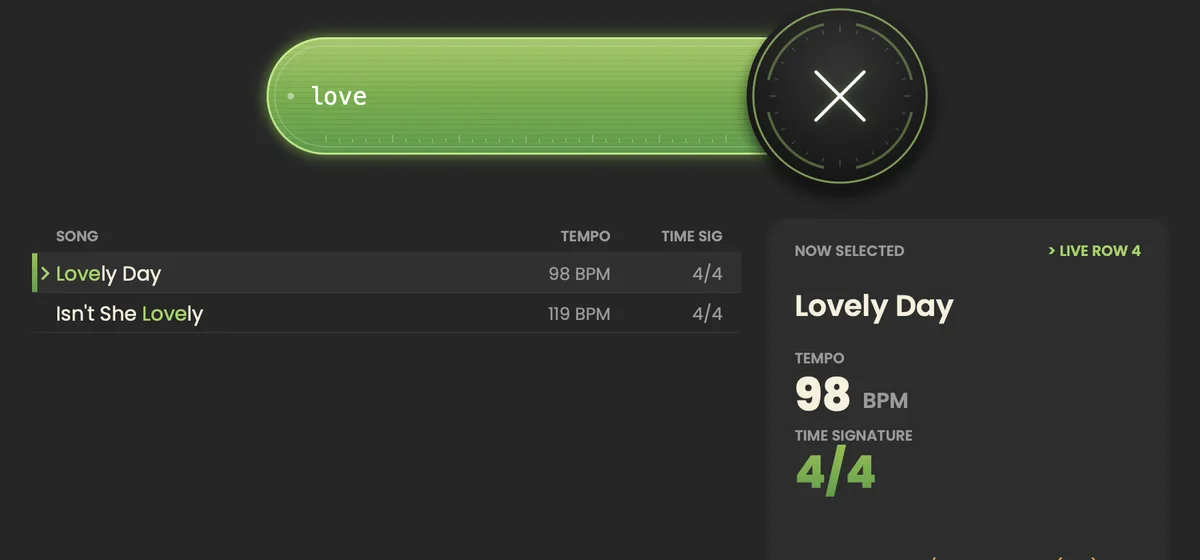
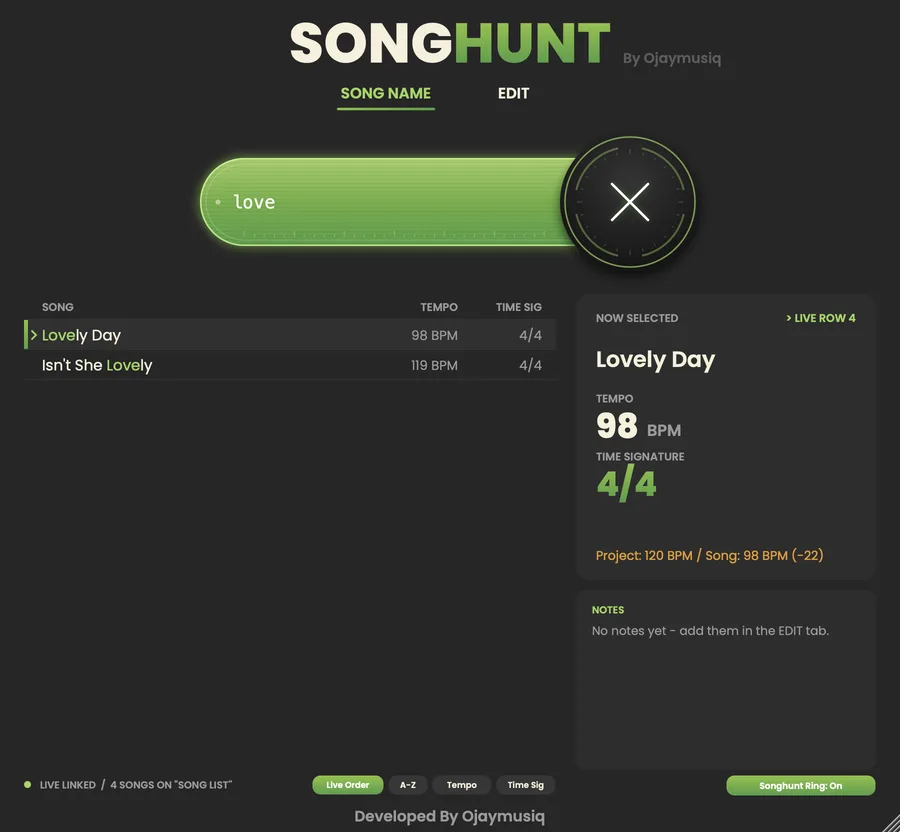
Typing “love” filters the list, with matching letters highlighted
01

Instant search.

Results appear as you type. Search ignores capitals and matches any part of the name (“love” finds Lovely Day). Matching letters are highlighted.

  • Keyboard-friendly. Up/Down and Enter pick a song, Esc clears the search. Turn on Enter Launch and Enter again launches that row in Live; Space, in the empty search, stops it.
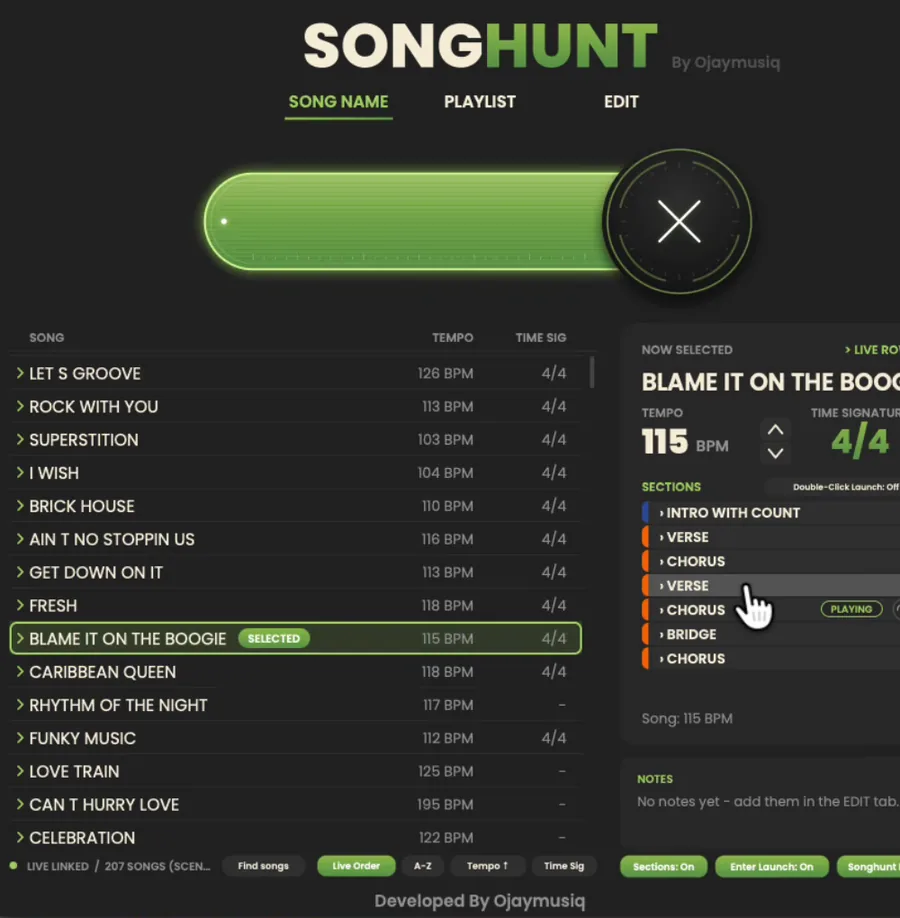
Songhunt’s SONG NAME view with Blame It On The Boogie selected and the CHORUS section marked PLAYING
02

Built for the stage.

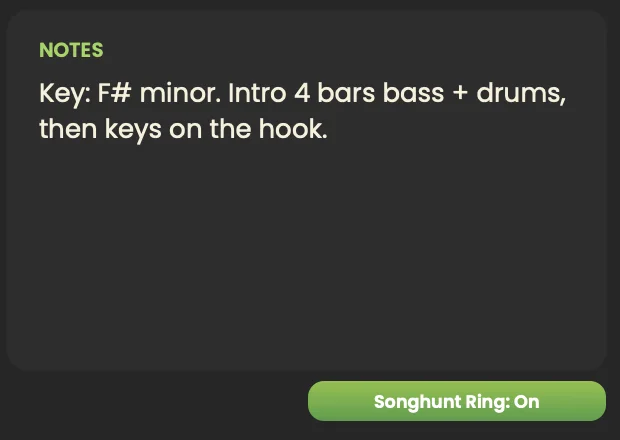
The selected song’s name, tempo and time signature are shown in big text, with your notes (key, chords, cues) right underneath.

  • The song’s own tempo. Now Selected shows that tempo, for example Song: 117 BPM. Tempo up and down change Live’s tempo live while the song plays. The change is not saved, and the next song starts at its own tempo.
  • Sections. Turn Sections on and the song’s named rows appear here, in Live’s colours. Click one, or use Up and Down, to get it ready.
  • Section Loop. With Sections on, the playing section shows a loop button. Click it to keep that section repeating; click again and it plays to its end once more, then the song carries on. Launching another section ends the loop.
  • Blink in Live. The scene Live plays flashes on the beat in Session view, in a colour you pick. Off until you turn it on.
The Notes panel and the Songhunt Ring: On button
03

Jumps Live to the song.

Picking a song selects its scene (row) in Live and moves the session box on controllers like Push, APC, Launchpad and MPK to that row. The picked song gets a bright green outline and a SELECTED label. Nothing starts until you’re ready.

  • Songhunt Ring. No controller? Songhunt draws its own red ring in Live: five rows from the chosen song, across every track to the Main track. Turn it on or off with one button; the choice is saved with your Live Set.
  • Enter Launch. For playing without a controller. When it’s on, Enter again launches the row, and Space stops Live. Off until you turn it on, and saved with your Live Set.
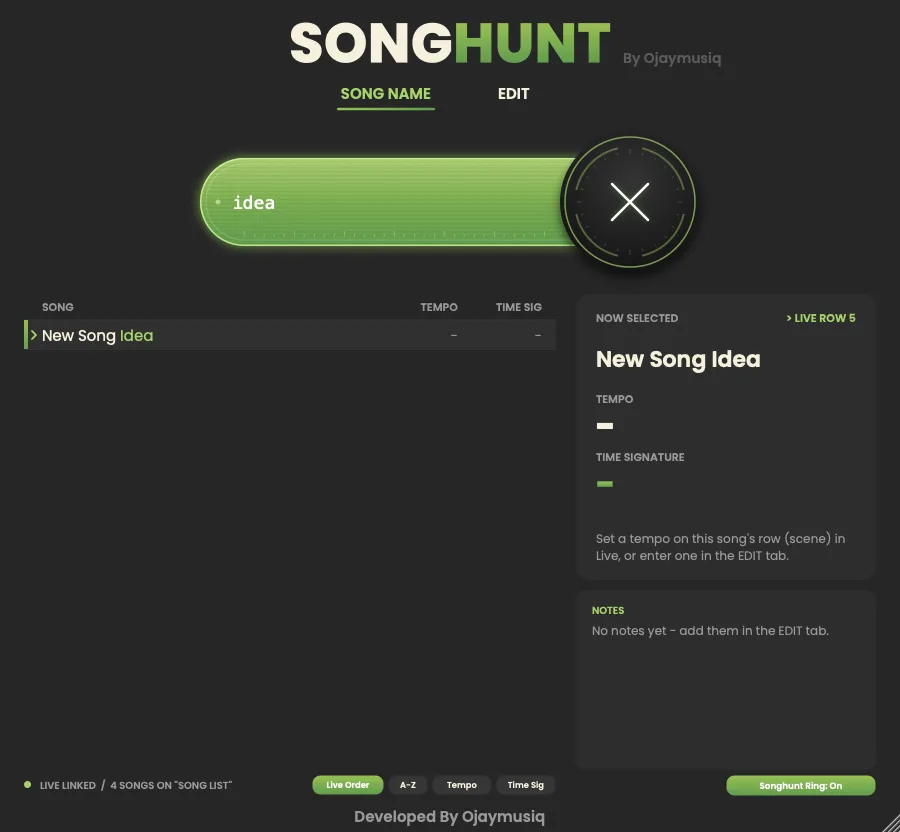
Searching “idea” finds New Song Idea, a song found only in the Live Set, at LIVE ROW 5
04

Reads your Live Set.

Name a clip >Song Name on a track called Song List, and it appears in Songhunt automatically. No typing everything in twice.

  • Two-way sync. Rename a > clip in Live and Songhunt follows.
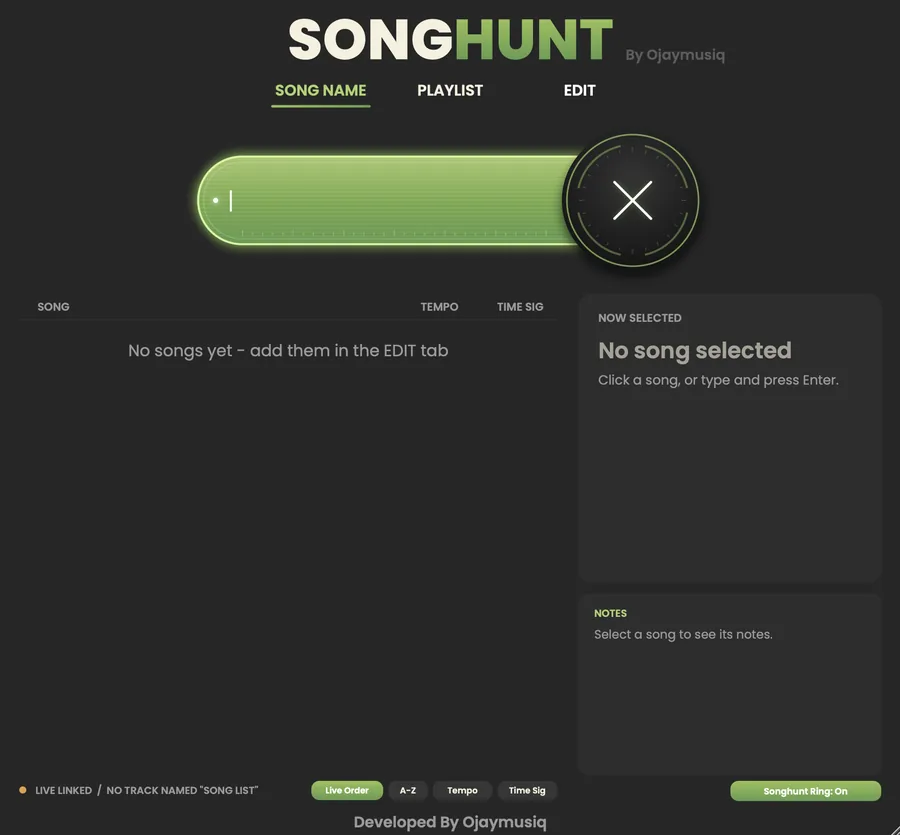
  • Find my songs. No Song List track? Songhunt shows “No songs yet.” Click Find my songs and it reads your scene names (rows such as INTRO, VERSE or CHORUS are treated as sections). Check the list once, then use these songs. Saved with your Live Set.
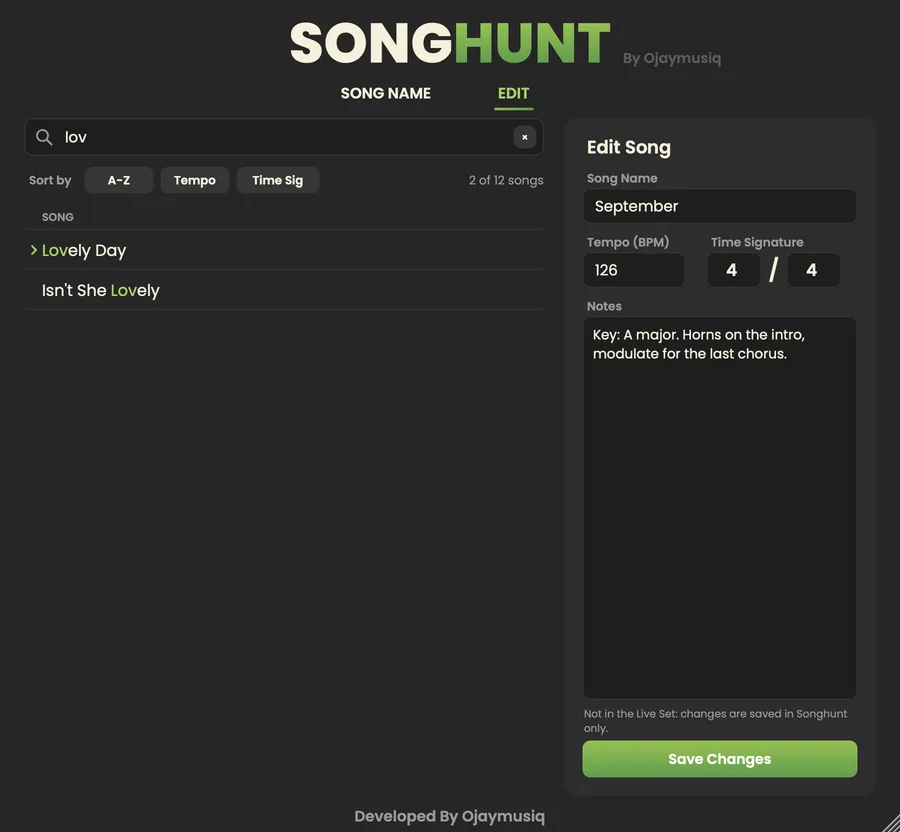
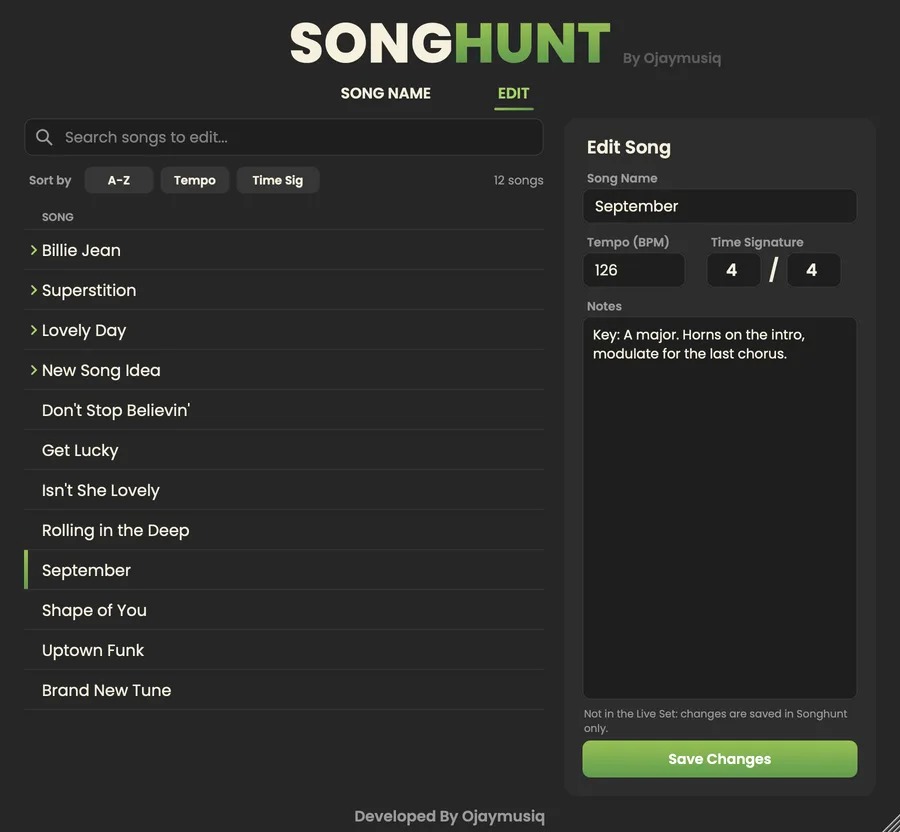
The EDIT tab while searching: search field, song list and the Edit Song form
05

Edit in one place.

Search for a song in the EDIT tab, then rename it or change its tempo, time signature or notes. Live is updated too: the clip name and the scene’s tempo and time signature. The song keeps its place in your set.

  • Remove from library. Clear out an old song that no longer has a > clip in the open Live Set. Songs that still have a clip are left alone.
  • Export and Import. On the EDIT tab, Export saves all your songs (name, tempo, time signature and notes) to one file. Import on another Mac adds new songs and updates matching names with the file’s tempo, time signature and notes. Nothing is removed. Your Live Set still brings its own song list, sections and playlists.
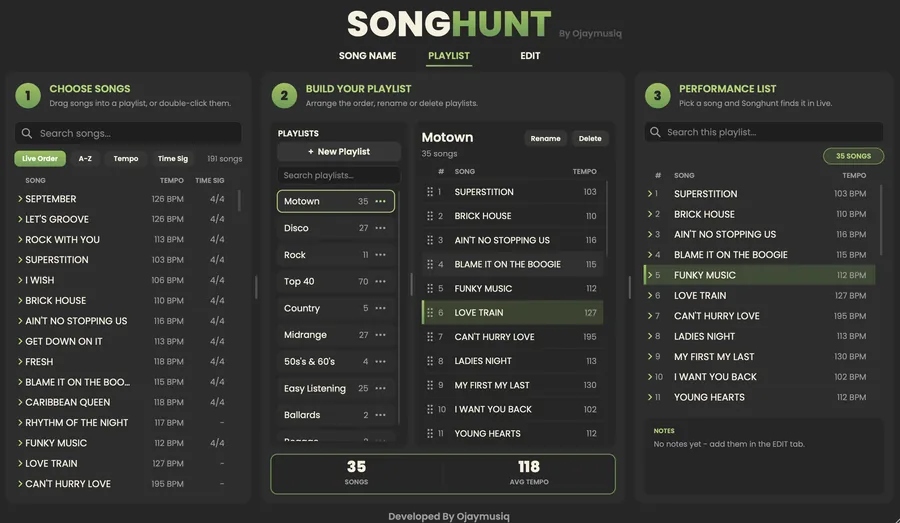
Songhunt PLAYLIST tab: choose songs, build your playlist and the performance list
06

Play from a playlist.

The PLAYLIST tab, between SONG NAME and EDIT. Make playlists from your songs and perform from them. Clicking a song selects it in Live, exactly like on SONG NAME, with its notes below.

  1. Choose songs. The same search, with typo matching, and the same sort buttons. Drag a song into a playlist, double-click it, or search and press Enter.
  2. Make your playlist. Create, rename, delete and reorder playlists. Drag songs into order, or use the up and down arrows. A summary shows the number of songs and the average tempo.
  3. Performance list. The playlist in order, ready for the gig. Click a song to select it in Live. Type in its search box to find a song in a long list. With Enter Launch on, click a song, then Enter launches it. Double-click a song to launch it when Enter Launch or Double-Click Launch is on.

Playlists are saved in your Live Set, so save the set to keep them. A new Live Set starts with none. They follow songs that are renamed.

SongHunt Remote
Control Songhunt from a phone or tablet on the same Wi-Fi as your Mac. Open SongHunt Remote on the Mac, then scan the QR code or enter the PIN in the device’s browser. No app to install on the phone or tablet. Launch sections, Loop, and Double-Tap Launch; see progress, tempo and time signature, and Live’s mixer.
Click button
Turns Live’s metronome on or off, same as Live’s own switch. It’s on every tab, and on SongHunt Remote.
Sort your list
By Live order, A–Z (click again for Z–A), tempo (click again for highest first) or time signature. The choice is saved with your Live Set.
Big setlists welcome
15 songs on screen (more in a taller window), and up to 10,000 songs per set, still instant to search.
Resize and zoom
Drag the edges to show more. Drag the corner to zoom from 60% to 200%. The window stops at the screen edge and the Dock.
One library for every project
Songs and notes are saved once and shared by all your Live Sets.
Doesn’t touch your sound
Songhunt passes audio through untouched, so you can put it on any track.
Easy install and clean uninstall
With a one-click installer, an uninstaller, and a fix tool for setups where Live runs from an external drive.

How it works.

  1. Install

    Install Songhunt with the installer (about 1 minute).

  2. Turn it on

    In Live: rescan plug-ins, and choose Songhunt as a Control Surface.

  3. Name your songs

    On a track called Song List, name each song’s clip with a > in front, e.g. >Billie Jean. No Song List track? Click Find my songs and Songhunt reads your scene names.

  4. Find

    Drop Songhunt on any track, type to find a song, and Live jumps to it.

Why a “control surface”?

Ableton doesn’t let plug-ins control Live by themselves. Songhunt includes a small control surface script (installed automatically), which works in every edition of Live, including Standard. Max for Live is not needed.

See Songhunt.

Screenshots use demo songs. Scroll sideways for more.

The SONG NAME view: search bar, a 15-song list with Blame It On The Boogie marked SELECTED, Now Selected with sections, tempo arrows and Song: 115 BPM, and Enter Launch on
Songhunt beside Ableton Live’s Session view, with Blame It On The Boogie selected in the plug-in and highlighted in Live
Songhunt’s SONG NAME view with Blame It On The Boogie selected and the CHORUS section marked PLAYING
Typing “love”: live filtering with highlighted letters
A song found only in the Live Set, with its Live row shown
The “No songs yet” message
The EDIT tab: search, song list, name, tempo, time signature and notes
The EDIT tab while searching

Tech specs.

Songhunt is currently for macOS only. There’s no Windows version yet.

Operating system
macOS 11 Big Sur or newer
Processor
Apple Silicon or Intel
Host
Ableton Live 11 or 12: Intro, Standard or Suite
Plug-in formats
Audio Unit (AU) and VST3
Max for Live
Not needed
Disk space
About 20 MB
License
License key from your receipt email. A regular key works on 2 computers, a Lifetime key on 3; after activating, Songhunt works offline. License checks happen quietly in the background, at most every 14 days, and never interrupt you on stage.
Install
  1. Quit Ableton Live. Open the download and double-click Songhunt Installer.
  2. In Live, go to Settings → Plug-Ins, turn on Use Audio Units and Use VST3 Plug-In System Folders, then hold Option and click Rescan. Then go to Settings → Link, Tempo & MIDI and choose Songhunt as a Control Surface.
  3. Name a track Song List, name song clips like >Billie Jean, and drag Plug-Ins → Ojaymusiq → Songhunt onto any track. No Song List track? After Songhunt is on a track, click Find my songs and it reads your scene names.
  4. The first time, Songhunt asks for your license key. Paste it and click Activate. You need to be online for this once.

If your Mac says the installer can’t be opened (it’s from an independent developer): click Done, open System Settings → Privacy & Security, scroll down and click Open Anyway next to “Songhunt Installer”, then confirm. On macOS 14 or older you can also right-click the installer and choose Open.

Uninstall
Run Songhunt Uninstaller. It removes everything, and the song list is moved to the Trash. Your license activation stays on this Mac, so reinstalling won’t ask for the key again.
Buy
· license key by email, 2 computers per key (Lifetime: 3)
Support
support@songhuntplugin.com

One price. Yours to keep.

One-time payment. No subscription.

Current version

$29one-time

The latest version of Songhunt, with free updates.

  • Latest Songhunt for macOS (AU & VST3)
  • Free updates for the current version
  • Major new versions are a paid upgrade
  • 2 computers per key; works offline after activating

Lifetime Best value

$59one-time

Includes all future updates and versions of Songhunt.

  • Latest Songhunt for macOS (AU & VST3)
  • Free updates, forever
  • All future major versions included
  • 3 computers per key; works offline after activating

License key by email. Regular keys work on 2 computers, Lifetime keys on 3. Additional licenses 30% off when a key is already on all its computers.

What players say.

Reviews coming soon. Be the first to share yours.

Write a review

Questions.

Does it work with Ableton Live Standard / Intro?

Yes. Songhunt works with Intro, Standard and Suite, and doesn’t need Max for Live.

Is there a Windows version?

Not yet. Songhunt is currently for macOS only.

Does Songhunt change my sound?

No. It passes audio through untouched.

Does it work with my controller (Push, APC, Launchpad...)?

Yes. It runs alongside them, and picking a song moves their session box to the song’s row. Some third-party controller scripts don’t allow this; use the controller’s own “follow selection” setting for those.

My Mac says the installer “can’t be opened.”

It’s from an independent developer. Click Done, open System Settings → Privacy & Security, scroll down and click Open Anyway next to “Songhunt Installer”, then confirm. On macOS 14 or older you can also right-click the installer and choose Open.

“Songhunt” isn’t in the Control Surface list.

This usually happens when Live’s library is on an external drive. Quit Live and run Fix Songhunt Control Surface from the download.

How many computers can I use Songhunt on?

A regular license key works on 2 computers; a Lifetime key works on 3. After activating, Songhunt works offline. To move your key to another computer, click “Change license” at the bottom of the EDIT tab first. Need another computer? Additional licenses are 30% off.

Where is my license key?

In your receipt email. Paste it once and click Activate; you need to be online for this once.

I need help with my key or a new computer.

Email support@songhuntplugin.com.

Where are my songs saved?

On your Mac, shared by all your Live Sets: ~/Library/Application Support/Ojaymusiq/Songhunt/

Will uninstalling delete my songs?

The uninstaller moves your song list to the Trash, so you can restore it until you empty the Trash.

Can I launch a song from Songhunt?

Picking a song selects its row in Live. Turn on Enter Launch, next to Songhunt Ring, and Enter launches that row. Space, in the empty search, stops Live. On the Performance List, click a song, then press Enter (with Enter Launch on) to launch it. Double-click a song to launch it when Enter Launch or Double-Click Launch is on. Type in the Performance List search box to find a song in a long list. Enter Launch is off until you turn it on, and the choice is saved with your Live Set.

What are Sections?

With Sections on, Songhunt lists the picked song’s named rows from Live under Now Selected, in Live’s colours. Click one, or use Up and Down, to mark it READY. Enter launches it when Enter Launch is on. A double-click launches it when Double-Click Launch is on. A song with fewer than two sections looks the same as before. Sections is off until you turn it on.

Can I change the tempo on stage?

Yes. The tempo buttons next to Now Selected change Live’s tempo by 1 BPM while that song plays. Hold a button to keep stepping. The change is not saved. When another song starts, the tempo returns to that song’s own tempo.

The song I picked doesn’t stay selected.

In Live, turn off Select on Launch under Settings → Record, Warp & Launch. The song you picked then stays selected while another song plays.

How do I open the tutorial again?

The short tutorial opens once, the first time. The ? at the top right of Songhunt opens it again.

How do I remove an old song?

On the EDIT tab, Remove from library is there for a song that no longer has a > clip in the open Live Set. A song that still has a clip is left alone.

How will I know about a new version?

When a newer Songhunt is out, the bottom of the window shows Update available. Installing over the old one keeps your songs and your activation.

Still have a question? Email support@songhuntplugin.com, or

SONGHUNT logo: a neon-green magnifying glass between audio bars

Your setlist, one keystroke away.

Songhunt for Ableton Live on macOS. $29 one-time.

With warm wishes for the season.

See pricing